
|
start | ws-1 & clones | programming | clock | mods | famous presets
Sequencer Memory
You can program the sequencer with 4 different Patterns (I to IV). Each Pattern can contain a maximum of 4 instruments that you can choose yourself with the INSTRUMENT SELECTOR knob. A programmed Pattern consists of 2 Bars, which is basically the same as when you have selected a Preset Pattern and switch the VARIATION knob to RHYTHM (A<=>B): the Preset Pattern becomes a 2 Bar Pattern. Alternating between Pattern A and B.
Guerilla programming
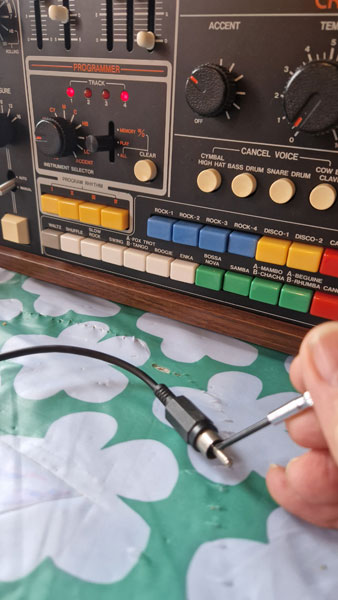 You can program the CR-78 by shortcutting the WRITE port connector. With a screw driver.
After programming this way, you play back the rhythm at the slowest speed, and maybe pair the programmed rhythm with a preset. The reason you can actually program the CR-78 like this and get away with it, is because the WRITE port is basically an on/off switch.
On=write, Off=do nothing.
The port does not like to accept any voltages. Although I have fed the port with 5 volts, and it didn't complain.
You can also swap the screwdriver technique with an on/off foot pedal.
A. Preparation
- Switch on the CR-78.
- Connect a mono jack to the WRITE port and get a screw driver.
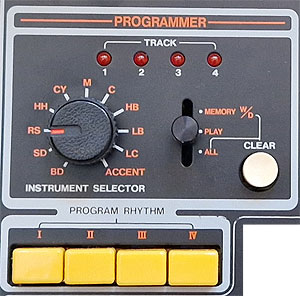
- go to the PROGRAMMER section on the front panel
- push the yellow PROGRAM RHYTHM number I
- to clear the selected program: set the switch to ALL and press CLEAR
- set the TEMPO to 4 or so
Tip: the CANCEL VOICE buttons have no effect on the instruments of mprogrammed rhythms.
B. Programming
1. set the switch to MEMORY W/D and select an instrument with the INSTRUMENT SELECTOR
2. press START/STOP to start the sequencer
3. shortcut the connector with the screwdriver,
you will hear the selected instrument when you bridge the connection,
the sequencer does not play the instrument from memory yet.
4. press START/STOP again when you think you're done.
C. Listen to the result
5. set the programmer switch to PLAY
6. select another instrument with the INSTRUMENT SELECTOR.
if you don't, the programmed instrument will be muted during play.
7. press the START/STOP button
8. If you're unhappy with the result, no problem. However you can not delete individual 'notes' from the sequence, you have to erase the whole instrument.
Select the correct instrument, set the switch to MEMORY W/D and press CLEAR to wipe this instrument track from the current rhythm track.
Enjoy the mayhem, but don't worry.
Switch to another instrument, and repeat from step 1. The next TRACK LED will light up during programming.
| When you're done, switch to PLAY and turn the tempo knob to one of its lowest setting. - you can mute a programmed instrument, by selecting the instrument with the INSTRUMENT SELECTOR, - you can add another instrument live by switching to that instrument and bridgeing the connector, - the ADD VOICE part is preprogrammed, you can slide the volume up and down for extra spice, - add another preset by holding the button of your your programmed rhythm and another preset button at the same time. |
Fun!
Instrument selector
From the manual:
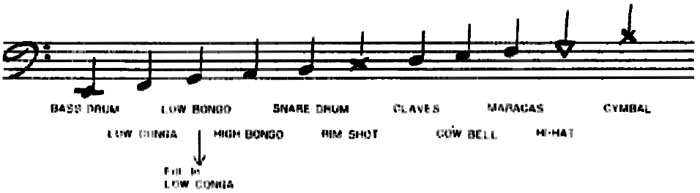
On the front panel you see more some more instrument level sliders and buttons than on the INSTRUMENT SELECTOR.
Not all can be programmed.
You can not program the COW BELL, METALLIC BEAT, TAMBOURINE or GUIRO instrument.
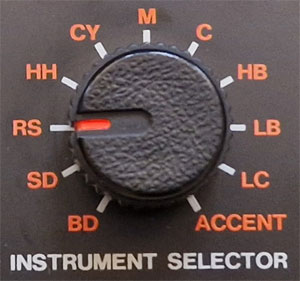 |
BD SD RS HH CY M C HB LB LC |
BASS DRUM SNARE DRUM RIM SHOT HI-HAT CYMBAL MARACAS CLAVES HIGH BONGO LOW BONGO LOW CONGA |